www.1ask2.comHow do you understand the Exchange Servers authentication?
First, you must know that following truth:
Within the same forest, Exchange Servers universal group contains all the Exchange Servers in the forest. The default receive connector of a Hub Transport server has the following permissions assigned. You could use the ADSIEDIT.msc tool to find out.
At US.areyou.com transport server:
ADSIEDIT -- Configuration --Services --Microsoft Exchange --First Organization--Exchange Administrative Group--Servers--US--Protocols--CN=SMTP receive Connectors
Double-click CN=Default US --Security Tab
You will find the permissions assigned to Exchange Servers universal group.
With the same forest, a send connector in Hub transport server A can communicate with a receive connector in Hub Transport server B by Exchange Server Authentication because the Exchange Servers universal group granted on the default receive connector.=============
How about cross-forest? Can we implement the Exchange Server authentication? Yes, we can!!!

The above diagram shows the two forests: areyou.com and itsme.com.
1. DNS
At US.Areyou.com,
areyou.com primary zone
Itsme.com secondary zone
At Canada.itsme.com,
Itsme.com primary zone
Areyou.com secondary zone
Make sure all the zones have the active directory records (SRV).
2. create two-way forest trust
At canada.itsme.com:
 At US.Areyou.com:

To make your trust relationship works, at US.areyou.com computer, create a folder and assigns the permission to Sam@itsme.com user. at Canada.itsme.com, create a folder and assigns the permission to Jim@areyou.com user. If you could complete the permission assignment, you can move forward.
3.Default Receive Connector permission
At US.areyou.com, ADSIEDIT.msc:
Configuration --Services --Microsoft Exchange --First Organization--Exchange Administrative Group--Servers--US--Protocols--CN=SMTP receive Connectors--CN=Default US --Properties --Security --Add canada@itsme.com computer object to the ACL and assign the same permissions as Exchange Servers universal group.
At Canada.itsme.com, ADSIEDIT.msc:
Configuration --Services --Microsoft Exchange --First Organization--Exchange Administrative Group--Servers--Canada--Protocols--CN=SMTP receive Connectors--CN=Default Canada --Properties --Security --Add US.areyou.com computer object to the ACL and assign the same permissions as Exchange Servers universal group.
4.
At US.areyou.com, Exchange Management Console:
Accepted Domain: itsme.com Internal usage type
Send connector:
new-SendConnector -Name 'itsme.com' -Usage 'Internal' -AddressSpaces 'SMTP:itsme.com;1' -IsScopedConnector $false -DNSRoutingEnabled $false -SmartHosts 'canada.itsme.com' -SmartHostAuthMechanism 'ExchangeServer' -UseExternalDNSServersEnabled $false -SourceTransportServers 'US'
At Canada.itsme.com,
Accepted domain: areyou.com Internal Usage type
Send connector:
new-SendConnector -Name 'areyou.com' -Usage 'Internal' -AddressSpaces 'SMTP:areyou.com;1' -IsScopedConnector $false -DNSRoutingEnabled $false -SmartHosts 'US.areyou.com' -SmartHostAuthMechanism 'ExchangeServer' -UseExternalDNSServersEnabled $false -SourceTransportServers 'Canada'
=====
Why do we need the Exchange Servers authentication?
One example:
Exchange stamps a message with an X-header called X-MS-Exchange-Organization-OriginalSize, which indicates the original message size. When the message is transported to other transport servers, its size may increase because of format conversion, encoding, and agent processing. With the X-MS-Exchange-Organization-OriginalSize header, the down-stream transport rule will not block the message.
Another example:
When Exchange 2007 anti-spam agents process a message, it places x-headers such as Spam Confidence Level in the message header. If you examine a message header after it has passed through a hub transport server or Edge Transport server, you will see x-headers such as X-MS-Exchange-Organization-Antispam.


 If you uncheck the Windows File Shares and Windows SharePoint Services, the Documents item on OWA window will disappear.

 If itsme.com suffix is not treated as internal, you can only open the location as http://s2003ex1/xxx


 1-->2-->3-->4


 The cost should reflect the physical network connection. For example, 100 for 10Mbps network and 10 for the 100Mbps network.
 What does the fully-routed network mean for a hub-spoke topology?


 If you configure a send connector with name space:* and its source transport server includes one from Site A, one from Site B, and one from Site C, local transport server will always handle the mail delivery for mailbox users in its site. For example, when
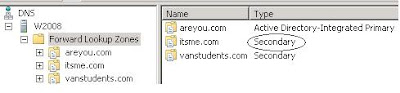 mx record is created for areyou.com
 mx record is created for itsme.com.
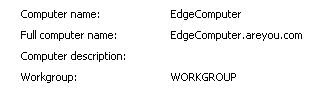 The Host (A) record is created in areyou.com zone.
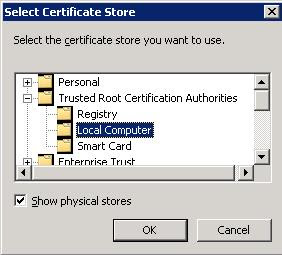 For the local CA, it is important that the CA certificate is put into Trusted Root Certificate Authorites.
 Additional Attributes must be set to EnhancedKeyUsage:Server Authentication
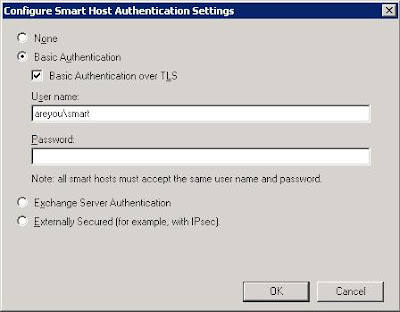 ========