Sunday, February 28, 2010
Friday, January 16, 2009
Install Deadline in Fedora
Refer www.1ask2.com
Allow regular user to run it.
After you install the deadline package, you must do the following:
mkdir /mnt/render
chmod a+rwx /mnt/render
Repository mount:
/etc/profile
mount -t cifs -o username=aRender,password=vanarts //renderserver/DeadlineRepository /mnt/render
chmod -R a+rwx /etc/deadline
Allow regular user to run it.
After you install the deadline package, you must do the following:
mkdir /mnt/render
chmod a+rwx /mnt/render
Repository mount:
/etc/profile
mount -t cifs -o username=aRender,password=vanarts //renderserver/DeadlineRepository /mnt/render
chmod -R a+rwx /etc/deadline


Thursday, January 15, 2009
Mount a windows share automatically
Refer www.1ask2.com
Windows computer name: renderserver
Windows share folder name: DeadlineRepository
Linux computer:
mkdir /mnt/render
/etc/profile
add the following line:
mount -t cifs -o username=Arender, password=vanarts //renderserver/DeadlineRepository /mnt/render
Windows computer name: renderserver
Windows share folder name: DeadlineRepository
Linux computer:
mkdir /mnt/render
/etc/profile
add the following line:
mount -t cifs -o username=Arender, password=vanarts //renderserver/DeadlineRepository /mnt/render
Thursday, December 4, 2008
Install Java in Fedora
Refer www.1ask2.com
Download the java package and install it.
cd /usr/lib/mozilla/plugins
ln -s /usr/java/jre1.6.0_11/plugin/i386/ns7/libjavaplugin_oji.so
Download the java package and install it.
cd /usr/lib/mozilla/plugins
ln -s /usr/java/jre1.6.0_11/plugin/i386/ns7/libjavaplugin_oji.so
DirectoryName or FileName with a space at end
Refer www.1ask2.com
Cannot delete files or directories when there are spaces at end of the name.

 C:\test>del "file://?/c:/test/my.txt "
C:\test>

Cannot delete files or directories when there are spaces at end of the name.
How do you create a file name with a space at the end?
Hello
Hello
^Z
1 file(s) copied.
C:\test>dir
C:\test>dir
How to delete it?
Could Not Find C:\test\my.txtC:\test>del "file://?/c:/test/my.txt "C:\test>
Tuesday, November 11, 2008
SideBySide
Dependent Assembly Microsoft.VC80.MFCLOC could not be found
Resolve Partial Assembly failed for Microsoft.VC80.MFCLOC. Reference error message: The referenced assembly is not installed on your system.
Generate Activation Context failed for C:\WINDOWS\WinSxS\x86_Microsoft.VC80.MFC_1fc8b3b9a1e18e3b_8.0.50727.762_x-ww_3BF8FA05\MFC80.DLL. Reference error message: The referenced assembly is not installed on your system.
Solution:
Download vcRedist.exe and install it.

Tuesday, October 28, 2008
win32time error
The time provider NtpClient is configured to acquire time from one or more time sources, however none of the sources are currently accessible. No attempt to contact a source will be made for 15 minutes. NtpClient has no source of accurate time.

Firewall configuration:
New Traffic policy:
 Source: Any
Destination: Time.Windows.Com
Service: NTP
Action: permit
Translation: NAT
PDC Emulator Role:
Net Time /setsntp:time.windows.com
DC:
Net time /setsntp:PDC Server
Member:
Net time /setsntp:PDC Server
After the configuration, in event viewer, you will see:
PDC Server: Zeeman2.vanarts.com
The time provider NtpClient is currently receiving valid time data from time.windows.com (ntp.m0x0191.121.11.2:123->207.46.197.32:123).
The time service is now synchronizing the system time with the time source time.windows.com (ntp.m0x0191.121.11.2:123->207.46.197.32:123).
Member server:
The time provider NtpClient is currently receiving valid time data from zeeman2 (ntp.m0x0191.121.11.1:123->191.121.11.2:123).
The time service is now synchronizing the system time with the time source zeeman2 (ntp.m0x0191.121.11.1:123->191.121.11.2:123).
Monday, October 27, 2008
Saturday, October 25, 2008
DSACLS.exe to restore permissions for Default global address list
www.1ask2.com
You must have the Windows Support Tools installed.
ADSIEDIT.MSC console
Deny READ Permission for Authenticated Users.


You cannot modify the permissions of Default Global Address List.
You cannot create new outlook profiles.
C:\Program Files\Support Tools>dsacls.exe "CN=Default Global Address List,CN=All Global Address Lists,CN=Address Lists Container,CN=Workopera,CN=Microsoft Exchange,CN=Services,CN=Configuration,DC=work,DC=com" /R "Authenticated Users"
C:\Program Files\Support Tools>dsacls.exe "CN=Default Global Address List,CN=All Global Address Lists,CN=Address Lists Container,CN=Workopera,CN=Microsoft Exchange,CN=Services,CN=Configuration,DC=work,DC=com" /I:T
You must have the Windows Support Tools installed.
ADSIEDIT.MSC console
Deny READ Permission for Authenticated Users.

You cannot modify the permissions of Default Global Address List.
You cannot create new outlook profiles.
C:\Program Files\Support Tools>dsacls.exe "CN=Default Global Address List,CN=All Global Address Lists,CN=Address Lists Container,CN=Workopera,CN=Microsoft Exchange,CN=Services,CN=Configuration,DC=work,DC=com" /R "Authenticated Users"
C:\Program Files\Support Tools>dsacls.exe "CN=Default Global Address List,CN=All Global Address Lists,CN=Address Lists Container,CN=Workopera,CN=Microsoft Exchange,CN=Services,CN=Configuration,DC=work,DC=com" /I:T
Sunday, October 19, 2008
Task "Microsoft Exchange server' reported error (0x8004010F): 'The operation failed. An object could not be found'

On EX20071 exchange 2007 server, create a new offline address list:


Friday, October 10, 2008
Windows Internal Database (Microsoft##SSEE)
How to connect to Microsoft##SSEE instance by named pipe protocol?
np:\\.\pipe\MSSQL$MICROSOFT##SSEE\sql\query
np:\\.\pipe\MSSQL$MICROSOFT##SSEE\sql\query
Saturday, September 20, 2008
Exchange2007:Safe Recipients
Refer www.1ask2.com
In outlook 2003 or later, I understand the Safe Senders list without problem. However, I puzzle at Safe Recipients List.
One thing is for sure, which is you should not put your own e-mail address under the Safe Recipients list. If you do, all mail including junk mail goes to your inbox.
Another thing is for you to understand the distribution group or distribution list. If you are the member of SeniorGroup distribution list with e-mail address SeniorGroup@terrace.com, a message sent to SeniorGroup@terrace.com will be delivered to your inbox if you put SeniorGroup@terrace.com under Safe Recipients List.
From: BaseShaw1 <BaseShaw1@terrace.com>To: Senior Group <SeniorGroup@terrace.com>Date: Sat, 20 Sep 2008 17:06:39 -0700Subject: test
Within your own organization, you don't need to put the Distribution List under Safe Recipients List. If you are a member of distribution list of Internet domain and you want to receive e-mail delivered to this group, you're better to put the distribution group e-mail address in Safe Recipients List.
In outlook 2003 or later, I understand the Safe Senders list without problem. However, I puzzle at Safe Recipients List.
One thing is for sure, which is you should not put your own e-mail address under the Safe Recipients list. If you do, all mail including junk mail goes to your inbox.
Another thing is for you to understand the distribution group or distribution list. If you are the member of SeniorGroup distribution list with e-mail address SeniorGroup@terrace.com, a message sent to SeniorGroup@terrace.com will be delivered to your inbox if you put SeniorGroup@terrace.com under Safe Recipients List.
From: BaseShaw1 <BaseShaw1@terrace.com>To: Senior Group <SeniorGroup@terrace.com>Date: Sat, 20 Sep 2008 17:06:39 -0700Subject: test
Within your own organization, you don't need to put the Distribution List under Safe Recipients List. If you are a member of distribution list of Internet domain and you want to receive e-mail delivered to this group, you're better to put the distribution group e-mail address in Safe Recipients List.
Wednesday, September 10, 2008


Cisco router 1811: Port forwarding with NAT
After you set up NAT, how do you configure port forwarding?
The example shows the remote desktop forwarding.


Cisco router 1811: NAT configuration
 Cisco Router and Security Device Manager

 ===============
If WAN uses the dynamic configuration, the IP, default gateway, and dns may change. How do you define the default route?
ip route 0.0.0.0 0.0.0.0 DHCP
Saturday, August 30, 2008
Exchange:Import customized Contacts Item folder
Scenario:
Outlook was set up with POP3 account. My Contacts have Contacts and Test Contacts 2008 folders.
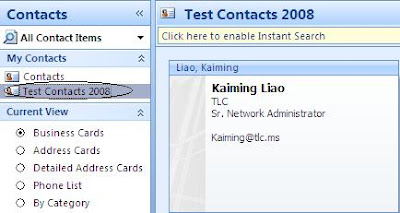
Export the whole personal folder to a pst file;
Create a Contacts Items folder with the same name and put it in MAILBOX folder (not contacts folder) as shown below:
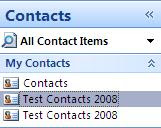
Drag and drop all Contacts from old "Test Contacts 2008" to the newly-created Test Contacts 2008" folder;
Remove the old "Test Contacts 2008" folder;
You would have the same address book structure as POP3 account profile.
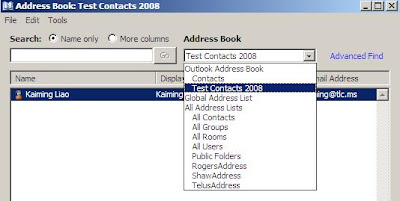
Outlook was set up with POP3 account. My Contacts have Contacts and Test Contacts 2008 folders.
Export the whole personal folder to a pst file;
Create a new outlook profile with Exchange Server setup;
After importing the pst file to the Exchange server profile, the Test Contacts 2008 folder shows when you click Contacts in Outlook. But the Test Contacts 2008 does not show in Address Book:
 What do you do?
Create a Contacts Items folder with the same name and put it in MAILBOX folder (not contacts folder) as shown below:

Drag and drop all Contacts from old "Test Contacts 2008" to the newly-created Test Contacts 2008" folder;
Remove the old "Test Contacts 2008" folder;
You would have the same address book structure as POP3 account profile.
Friday, August 8, 2008
Exchange2007:Export-Mailbox -DeleteContent
www.1ask2.com
A virus message was delivered to all mailboxes in server1. The subject is "I Love You!"
How can you delete it from the Exchange management shell?
get-mailbox -Server tlc25 I Add-MailboxPermission -AccessRights 'FullAccess' -User Administrator -confirm $false
New-Mailbox -Name 'Temp1' -Alias 'Temp1' -UserPrincipalName 'Temp2@TLCTest.local' -SamAccountName 'Temp1' -FirstName 'Temp1' -LastName '' -Database 'TLC25\First Storage Group\Mailbox Database'
get-mailbox -Server Tlc25 I Export-Mailbox -includefolders \inbox -SubjectKeywords 'I love you!' -TargetMailbox temp1 -TargetFolder virus -DeleteContent -confirm:$false
get-mailbox -Server tlc25 I Remove-MailboxPermission -AccessRights 'FullAccess' -User Administrator -confirm $false
======
DeleteContent
---delete the content from the source mailbox after it has been exported to a folder. The source folder will not be deleted.
A virus message was delivered to all mailboxes in server1. The subject is "I Love You!"
How can you delete it from the Exchange management shell?
get-mailbox -Server tlc25 I Add-MailboxPermission -AccessRights 'FullAccess' -User Administrator -confirm $false
New-Mailbox -Name 'Temp1' -Alias 'Temp1' -UserPrincipalName 'Temp2@TLCTest.local' -SamAccountName 'Temp1' -FirstName 'Temp1' -LastName '' -Database 'TLC25\First Storage Group\Mailbox Database'
get-mailbox -Server Tlc25 I Export-Mailbox -includefolders \inbox -SubjectKeywords 'I love you!' -TargetMailbox temp1 -TargetFolder virus -DeleteContent -confirm:$false
get-mailbox -Server tlc25 I Remove-MailboxPermission -AccessRights 'FullAccess' -User Administrator -confirm $false
======
DeleteContent
---delete the content from the source mailbox after it has been exported to a folder. The source folder will not be deleted.
Exchange2007:RemoteDomain and OOF (Out-of-Office)
www.1ask2.com
For most, we must understand "An Out-of-Office message is set on the clients (Outlook and OWA) but is sent by Exchange server."
How many types of clients do we have?
Outlook 2007
Outlook 2003 or earlier
OWA 2007
OWA 2003 or earlier

"Allow external out-of-office messages only" allows the external OOF messages from Outlook 2007 and OWA 2007.
"All external out-of-office messages and out-of-office messages set by Outlook 2003 or earlier clients or sent by Exchange server 2003 or earlier servers" allows the external OOF messages from Outlook 2007 and OWA 2007, and OOF messages from Outlook 2003 and OWA 2003 or earlier. Outlook 2003 and OWA 2003 don't have the external OOF and internal OOF feature.
"Allow internal out-of-messages, and out-of-office messages set by outlook 2003 or earlier clients or sent by Exchange server 2003 or earlier servers" allows the internal OOF messages from Outlook 2007 and OWA 2007, and OOF messages from Outlook 2003 and OWA 2003 or earlier.
The following cmdlet controls the individual mailbox can only send internal OOF messages.
SET-MAILBOX -IDENTITY 'Kevin.Smith' -ExternalOofOptions InternalOnly
For most, we must understand "An Out-of-Office message is set on the clients (Outlook and OWA) but is sent by Exchange server."
How many types of clients do we have?
Outlook 2007
Outlook 2003 or earlier
OWA 2007
OWA 2003 or earlier
In Exchange Management Console, the remote domain property has the following settings:
- Allow none ----I know it means no OOF sends to remote domain.
- Allow external out-of-office messages only ----???
- All external out-of-office messages and out-of-office messages set by Outlook 2003 or earlier clients or sent by Exchange server 2003 or earlier servers ----???
- Allow internal out-of-messages, and out-of-office messages set by outlook 2003 or earlier clients or sent by Exchange server 2003 or earlier servers ----???
"Allow external out-of-office messages only" allows the external OOF messages from Outlook 2007 and OWA 2007.
"All external out-of-office messages and out-of-office messages set by Outlook 2003 or earlier clients or sent by Exchange server 2003 or earlier servers" allows the external OOF messages from Outlook 2007 and OWA 2007, and OOF messages from Outlook 2003 and OWA 2003 or earlier. Outlook 2003 and OWA 2003 don't have the external OOF and internal OOF feature.
"Allow internal out-of-messages, and out-of-office messages set by outlook 2003 or earlier clients or sent by Exchange server 2003 or earlier servers" allows the internal OOF messages from Outlook 2007 and OWA 2007, and OOF messages from Outlook 2003 and OWA 2003 or earlier.
The following cmdlet controls the individual mailbox can only send internal OOF messages.
SET-MAILBOX -IDENTITY 'Kevin.Smith' -ExternalOofOptions InternalOnly
Wednesday, August 6, 2008
Exchange2007:Hub Site
www.1ask2.com
Least cost path
Site A to Site D has two paths.
Site A+Site B+Site D (cost=5+15)
Site A+Site C+Site D (cost=5+5)
The path A+C+D is chosen.
 How do you understand the direct delivery?
After the least cost path is selected, Hub transport server in Site A will directly deliver messages to the Hub Transport server in Site D. The Hub Transport server in Site C does not process the messages at all.
If you want the HUB Transport Server in SITE C to process the message, configure it as a hub site.
Set-AdSite -identity "Site C' -HubSiteEnabled:$true
Why would you do that?
One example will be that a company implements the centralized journaling.
Most of the time, you should not define a HUB Site. For this scenario, if Hub transport server in SITE C does not work, because Site C is a hub site, the messages from SITE A cannot be delivered to Site D.
If Site C is not defined as a HUB SITE, mail is directly delivered from SITE A to SITE D. Direct relay is not affected by lack of network connectivity between SITE A and Site C.
Least cost path
Site A to Site D has two paths.
Site A+Site B+Site D (cost=5+15)
Site A+Site C+Site D (cost=5+5)
The path A+C+D is chosen.
 How do you understand the direct delivery?
After the least cost path is selected, Hub transport server in Site A will directly deliver messages to the Hub Transport server in Site D. The Hub Transport server in Site C does not process the messages at all.
If you want the HUB Transport Server in SITE C to process the message, configure it as a hub site.
Set-AdSite -identity "Site C' -HubSiteEnabled:$true
Why would you do that?
One example will be that a company implements the centralized journaling.
Most of the time, you should not define a HUB Site. For this scenario, if Hub transport server in SITE C does not work, because Site C is a hub site, the messages from SITE A cannot be delivered to Site D.
If Site C is not defined as a HUB SITE, mail is directly delivered from SITE A to SITE D. Direct relay is not affected by lack of network connectivity between SITE A and Site C.
Exchange2007:3-way that messages go into the Transport Server
Store driver to Transport server is using MAPI over RPC.
Transport to Transport server is using Kerberos and TLS.

Transport to Transport server is using Kerberos and TLS.

Subscribe to:
Posts (Atom)