How to connect to Microsoft##SSEE instance by named pipe protocol?
np:\\.\pipe\MSSQL$MICROSOFT##SSEE\sql\query
Showing posts with label SQL Server 2005. Show all posts
Showing posts with label SQL Server 2005. Show all posts
Friday, October 10, 2008
Thursday, December 20, 2007
SQL: How to selectively create an index?
CREATE TABLE Sales
(
VideoID INT identity (1,1) not null Primary Key NonClustered,
VideoTitle varchar(15) NOT NULL,
RetailPrice Money NULL,
WholesalePrice Money NOT NULL,
Genre Char(15) NULL,
Barcode char(20) NOT NULL
);
You want to run the following query:
SELECT VideoID,VideoTitle, RetailPrice From Sales Order By VideoTitle
SELECT VideoTitle,Barcode,VideoID, WholesalePrice, Genre From Sales WHERE VideoID=5
What indexes should you create?
Solution:
Create Clustered index CL_videoTitle ON Sales(VideoTitle);
Create NONCLUSTERED INDEX inBV ON Sales(Barcode,VideoID)
INCLUDE (WholesalePrices, Genre);
==
You have a table named product, which has 40 columns. The most queries are as follows:
SELECT [Name],[ProductLine],[ListPrice],[Class],[Style]
FROM Product
WHERE ProductLine='T'
SELECT * FROM Product
ORDER BY [Name]
Solution:
Create a clustered index on the Name column because both queries include the [Name] column as its first field.
Create a nonclustered index on the ProductLine column and include the ListPrice,Class and Style columns.
(
VideoID INT identity (1,1) not null Primary Key NonClustered,
VideoTitle varchar(15) NOT NULL,
RetailPrice Money NULL,
WholesalePrice Money NOT NULL,
Genre Char(15) NULL,
Barcode char(20) NOT NULL
);
You want to run the following query:
SELECT VideoID,VideoTitle, RetailPrice From Sales Order By VideoTitle
SELECT VideoTitle,Barcode,VideoID, WholesalePrice, Genre From Sales WHERE VideoID=5
What indexes should you create?
Solution:
Create Clustered index CL_videoTitle ON Sales(VideoTitle);
Create NONCLUSTERED INDEX inBV ON Sales(Barcode,VideoID)
INCLUDE (WholesalePrices, Genre);
==
You have a table named product, which has 40 columns. The most queries are as follows:
SELECT [Name],[ProductLine],[ListPrice],[Class],[Style]
FROM Product
WHERE ProductLine='T'
SELECT * FROM Product
ORDER BY [Name]
Solution:
Create a clustered index on the Name column because both queries include the [Name] column as its first field.
Create a nonclustered index on the ProductLine column and include the ListPrice,Class and Style columns.


Saturday, December 15, 2007
DMV--sys.dm_db_index_usage_stats
Which non-clustered index(es) is/are most frequently used?

ibhect_id: identify a table
index_id --ID of the index. index_id is unique only within the object.
0 = Heap
1 = Clustered index
> 1 = Nonclustered index
use AdventureWorks
go
SELECT object_id,index_id from sys.dm_db_index_usage_stats
WHERE (user_seeks > 0
or user_scans > 0
or user_lookups > 0)
and index_id>1
SSIS: package configuration--deployment utility
Scenario: development environment and production environment
You created SQL server SSIS package to import data in your development environment. After successfully testing the SSIS package, you want to deploy the SSIS package in your production environment. However, your production environment uses a different table names than your development environment. What do you do?
Creata a SQL Server package configuration
Build a deployment utility (right click on the Project--properties--Deployment Utility--AllowConfigurationChanges to True--CreateDeploymentUtility to True--Build the project);
Copy the deployment folder of your SSIS project to your production SQL Server;
Execute the manifest file;
Note:
The deployment utility is a folder that contains the files you need to deploy the packages in an Integration Services project on a different server.
AllowConfigurationChange --A value that specifies whether configurations can be updated during deployment, such as the table name change.
You created SQL server SSIS package to import data in your development environment. After successfully testing the SSIS package, you want to deploy the SSIS package in your production environment. However, your production environment uses a different table names than your development environment. What do you do?
Creata a SQL Server package configuration
Build a deployment utility (right click on the Project--properties--Deployment Utility--AllowConfigurationChanges to True--CreateDeploymentUtility to True--Build the project);
Copy the deployment folder of your SSIS project to your production SQL Server;
Execute the manifest file;
Note:
The deployment utility is a folder that contains the files you need to deploy the packages in an Integration Services project on a different server.
AllowConfigurationChange --A value that specifies whether configurations can be updated during deployment, such as the table name change.
Monday, December 10, 2007
SQL: OpenQuery, OpenRowSet, and OpenDataSource
My SQL Server instance is: Vision.
Enable the Ad Hoc query:
Enable the Ad Hoc query:
 Run the Ad Hoc query:
The OPENDATASOURCE function can be used in the same Transact-SQL syntax locations as a linked-server name. Therefore, OPENDATASOURCE can be used as the first part of a four-part name that refers to a table or view name in a SELECT, INSERT, UPDATE, or DELETE statement, or to a remote stored procedure in an EXECUTE statement.
SELECT TOP 5 *
FROM OPENDATASOURCE('SQLNCLI',
'Data Source=Vision;Integrated Security=SSPI')
.AdventureWorks.HumanResources.Employee
SELECT a.*
FROM OPENROWSET('SQLNCLI', 'Server=Vision;Trusted_Connection=yes;',
'SELECT GroupName, Name, DepartmentID
FROM AdventureWorks.HumanResources.Department
ORDER BY GroupName, Name') AS a;
===
OpenQuery is used with a Linked Server.
--create a linked server, first
EXEC sp_addlinkedserver 'OracleSvr',
'Oracle 7.3',
'MSDAORA',
'ORCLDB'
GO
--run the OPENQUERY function
SELECT *
FROM OPENQUERY(OracleSvr, 'SELECT name, id FROM joe.titles')
GO
Thursday, December 6, 2007
SQL: Bulk-logged recovery model
One application scenario for Bulk-logged recovery model
In replication topology, the Subscriber database is set to bulk-logged recovery model when the snapshot is being applied. Doing so allows minimal logging of the bulk inserts performed during the application of the snapshot at the subscriber. After the snapshot application, you can change the subscription database to FULL RECOVERY MODEL.
In replication topology, the Subscriber database is set to bulk-logged recovery model when the snapshot is being applied. Doing so allows minimal logging of the bulk inserts performed during the application of the snapshot at the subscriber. After the snapshot application, you can change the subscription database to FULL RECOVERY MODEL.
Tuesday, December 4, 2007
SQL:NOT FOR REPLICATION
Create a transaction publication:

Modify the articles' properties:Copy foreign key constraints, Copy check constraints, and Copy user triggers are changed to TRUE.
 If Foreign Key Constraint, Check Constraint, and User Triggers are not copied to Subscribers, they are definitely not enforced. After they are copied to the Subscribers, NOT FOR REPLICATION option will make the differences.

 If you encrypt your triggers, they are not copied to the subscribers.
Modify the articles' properties:Copy foreign key constraints, Copy check constraints, and Copy user triggers are changed to TRUE.
 If Foreign Key Constraint, Check Constraint, and User Triggers are not copied to Subscribers, they are definitely not enforced. After they are copied to the Subscribers, NOT FOR REPLICATION option will make the differences.If you encrypt your triggers, they are not copied to the subscribers.
If a row is inserted by a user at the Publisher and that insert satisfies a check constraint on the table, database engine will not enforce the same constraint when the row is inserted by a replication agent at the Subscriber.
Monday, December 3, 2007
SSIS: Fuzzy Grouping
Source file: sample.txt
Mr.,Gustavo,Achong,gustavo0@adventure-works.com
Ms.,Catherine,Abel,catherine0@adventure-works.com
Ms.,Kim,Abercrombie,kim2@adventure-works.com
Sr.,Humberto,Acevedo,humberto0@adventure-works.com
Sr.,Pilar,Ackerman,pilar1@adventure-works.com
Mr.,Gustavo1,Achong,gustavo1@adventure-works.com
Mr,Gustavo2,Achong,gustavo2@adventure-works.com
Ms.,Catherine1,Abel,catherine1@adventure-works.com
Ms,Kim,Abercrombie,kim2@adventure-works.com
Ms.,Kim,Abercrombie,kimAbercrombie@adventure-works.com
BIDS--new project--Drag "Data Flow control" onto Control Flow pane and double click it;

Flat File Source:
Connection Managers: Flat
File Name: C:\Sample.txt
 Fuzzy Grouping:
 As seen, select the fuzzy criteria: Title, FirstName,LastName, and EmailAddress. Similarity Threshold: 0.8
Flat File Destination:
Flat File Connection Manager:Out
File Name: c:\output.txt
 Input and output mapping:
1,1,1,Mr.,Gustavo,Achong,gustavo0@adventure-works.com
6,1,0.92130822,Mr.,Gustavo1,Achong,gustavo1@adventure-works.com
7,1,0.92130822,Mr,Gustavo2,Achong,gustavo2@adventure-works.com
2,2,1,Ms.,Catherine,Abel,catherine0@adventure-works.com
8,2,0.93621671,Ms.,Catherine1,Abel,catherine1@adventure-works.com
4,4,1,Sr.,Humberto,Acevedo,humberto0@adventure-works.com
5,5,1,Sr.,Pilar,Ackerman,pilar1@adventure-works.com
9,9,1,Ms,Kim,Abercrombie,kim2@adventure-works.com
3,9,0.98750001,Ms.,Kim,Abercrombie,kim2@adventure-works.com
10,10,1,Ms.,Kim,Abercrombie,kimAbercrombie@adventure-works.com
_key_out identifies the grouping.
Sunday, December 2, 2007
SSIS: Fuzzy Lookup
Sample.txt


 Column 0 --AverageRate --numeric [DT_NUMERIC], Data Precision:18 and DataScale:8
Column 1--CurrencyAlternateKey--Unicode text stream [DT_WSTR], OutputWidth:3
Column 2--CurrencyName--Unicode text stream [DT_WSTR], OutputWidth:50

Execute the package and open the output file:
1.00010001,AED,Afghanl,.99960016,1
1.00010001,ADD,Algerian Dinarl,1.00100100,2
1.00020004,ARR,Argentine Pesol,.99990001,3

Re-execute the package, the output file will have:
1.00010001,AED,Afghanl,.99960016,
1.00010001,ADD,Algerian Dinarl,1.00100100,2
1.00020004,ARR,Argentine Pesol,.99990001,3
The CurrencyKey of the first row cannot be located. If you move the Similarity threshold to 0.8, the CurrencyKey of the first row and second row cannot be located.
1.00010001;AED;Afghanl;0.99960016
1.00010001;ADD;Algerian Dinarl;1.00100100
1.00020004;ARR;Argentine Pesol;0.99990001
1.00010001;ADD;Algerian Dinarl;1.00100100
1.00020004;ARR;Argentine Pesol;0.99990001
Referenced Table:dbo.DimCurrency
The data in Sample.txt, AED, ADD, ARR can not be used for transformation because the referenced table does not have the exact match. Fuzzy lookup control can solve the problem. Based on the CurrencyAlternateKey and CurrencyName, the fuzzy lookup control can find the CurrencyKey.
Flat File Source:
Column 0 --AverageRate --numeric [DT_NUMERIC], Data Precision:18 and DataScale:8Column 1--CurrencyAlternateKey--Unicode text stream [DT_WSTR], OutputWidth:3
Column 2--CurrencyName--Unicode text stream [DT_WSTR], OutputWidth:50
Column 3 --CurrentRate--numeric [DT_NUMERIC], Data Precision:18 and DataScale:8
Fuzzy Lookup:

Fuzzy Lookup:
Based on CurrencyAlternateKey and CurrencyName, the CurrencyKey will be closely matched.
Flat File Destination:
Execute the package and open the output file:
1.00010001,AED,Afghanl,.99960016,1
1.00010001,ADD,Algerian Dinarl,1.00100100,2
1.00020004,ARR,Argentine Pesol,.99990001,3
Adjust the Similarity threshold to 0.50
Re-execute the package, the output file will have:
1.00010001,AED,Afghanl,.99960016,
1.00010001,ADD,Algerian Dinarl,1.00100100,2
1.00020004,ARR,Argentine Pesol,.99990001,3
The CurrencyKey of the first row cannot be located. If you move the Similarity threshold to 0.8, the CurrencyKey of the first row and second row cannot be located.
SSIS: Lookup
Lookup:Exact Match

SELECT CurrencyKey,CurrencyAlternateKey FROM DimCurrency
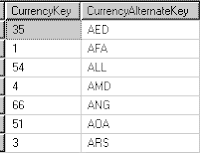
Data in sample.txt file will be transformed. The transformation references two tables:DimTime and DimCurrency.
BIDS--Create an SSIS project
Drag "Data Flow Task" onto Control Flow pane;
Double Click "Data Flow Task" to navigate to Data Flow pane;

"Flat File Source"
 Make sure you tick the CurrencyKey in the Available Lookup Columns. OK. Save it.
"Lookup 1 control"
Connection to dbo.DimTime of AdventureWorksDW database;
 Make sure you tick the TimeKey column.
"Flat File Destination"
New Flat File Connection Manager: File Name C:\outputFile.txt
Database: AdventureWorksDW
Reference Tables: dbo.DimTime and dbo.DimCurrency
SELECT TimeKey,FullDateALternateKey FROM DimTime
SELECT CurrencyKey,CurrencyAlternateKey FROM DimCurrency
Flat File: sample.txt
1.00050025;AED;9/7/2001 0:00;0.99990001
1.00050024;AED;9/8/2001 0:00;1.001001001
1.00030025;AED;9/9/2001 0:00;1
1.00010001;AED;9/10/2001 0:00;1.00040016
1.00020004;AED;9/11/2001 0:00;0.99980801
1.00050001;AED;9/12/2001 0:00;1.001101211
1.00050024;AED;9/8/2001 0:00;1.001001001
1.00030025;AED;9/9/2001 0:00;1
1.00010001;AED;9/10/2001 0:00;1.00040016
1.00020004;AED;9/11/2001 0:00;0.99980801
1.00050001;AED;9/12/2001 0:00;1.001101211
Data in sample.txt file will be transformed. The transformation references two tables:DimTime and DimCurrency.
BIDS--Create an SSIS project
Drag "Data Flow Task" onto Control Flow pane;
Double Click "Data Flow Task" to navigate to Data Flow pane;
"Flat File Source"
File Name=C:\sample.txt and create the advanced mapping as:
- Column 0 --AverageRate --numeric [DT_NUMERIC], Data Precision:18 and DataScale:8
- Column 1--CurrencyAlternateKey--Unicode text stream [DT_WSTR], OutputWidth:3
- Column 2--FullDateAlternateKey--database timestamp [DT_DBTIMESTAMP]
- Column 3 --EndOfDayRate--numeric [DT_NUMERIC], Data Precision:18 and DataScale:8
"Lookup" transformation item
Connection to dbo.DimCurrency of AdventureWorksDW database;
Make sure you tick the CurrencyKey in the Available Lookup Columns. OK. Save it."Lookup 1 control"
Connection to dbo.DimTime of AdventureWorksDW database;
Make sure you tick the TimeKey column."Flat File Destination"
New Flat File Connection Manager: File Name C:\outputFile.txt
 Save the package and execute it;
The c:\outputFile.txt will have:
1.00050025,.9999000100,35,69
1.00050024,1.0010010010,35,70
1.00030025,1.0000000000,35,71
1.00010001,1.0004001600,35,72
1.00020004,.9998080100,35,73
1.00050001,1.0011012110,35,74
====
data cleansing
Flat File:sample1.txt
1.00010001;AED;7/3/2001 1:00;0.99960016
1.00010001;AEC;7/4/2001 0:00;1.00100100
1.00020004;AFB;7/5/2001 2:00;0.99990001
1.00020002;ALL;7/6/2001 0:00;1.00040015
1.00050025;ALL;7/7/2001 4:00;0.99990001
1.00050024;ALH;7/8/2001 2:00;1.001001001
1.00030025;AND;7/9/2001 0:00;1
1.00010001;AND;7/10/2001 5:00;1.00040016
1.00020004;AMD;7/11/2001 1:00;0.99980801
1.00050001;AMD;7/12/2001 0:00;1.00110121
AED and AEC are not in the dbo.DimCurrency. Similarly, the time (in red) is not in dbo.DimTime table.
If you apply the sample1.txt to the above package, it fails with the error message:
Information: 0x402090DD at Data Flow Task, Flat File Source [1]: The processing of file "C:\sample1.txt" has ended.
Information: 0x402090DD at Data Flow Task, Flat File Destination [745]: The processing of file "D:\AOL\outputFile.txt" has ended.
Information: 0x40043009 at Data Flow Task, DTS.Pipeline: Cleanup phase is beginning.
Information: 0x4004300B at Data Flow Task, DTS.Pipeline: "component "Flat File Destination" (745)" wrote 0 rows.
Saturday, December 1, 2007
SSIS:passing a value from package A to package B
Parent Package (A) and Child Package (B)
 Double_click P_SQL.dtsx;
In General screen, three inputs are expected:
When the SQL statement returns a single row, the column of ResultSet can be assigned to a package variable.
Double_click "Execute Package Task": call C_SQL.dtsx package

Create a same variable as the one in P_SQL.dtsx package: varID with INT32 type
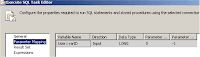
Parameter Mapping:
INPUT: passing the value of a variable onto a query parameter
OUTPUT:assigning the value from the query parameter to a variable
C_SQL.dtsx package configuration; make sure you choose the Parent Package Variable
 Save the S_SQL.dtsx package;
Double Click P_SQL.dtsx
Execute the package
You will find a Test5 table created and populated with data whose EmployeeID number is greater than 100.
Observation:
Don't define a table parameter. I tried the following: SELECT * FROM ?
The variable and the parameter cannot be mapped.
======
FROM book online:
USE AdventureWorks
GO
CREATE TABLE tableName
(
Tid INT NULL,
TName VARCHAR(50) NULL
)
INSERT tableName (Tid,TName)
VALUES (100,'Kim');
GO
CREATE TABLE tableName
(
Tid INT NULL,
TName VARCHAR(50) NULL
)
INSERT tableName (Tid,TName)
VALUES (100,'Kim');
Create a Integration Service Solution with two projects: P_SQL.dtsx and C_SQL.dtsx.
Double_click P_SQL.dtsx; Drag "Execute SQL Task" and "Execute Package Task" onto Control Flow pane;
SSIS menu--Variables--Add a new variable: varName with INT32 type
In General screen, three inputs are expected:
SQL Statement: SELECT Tid FROM dbo.tableName WHERE TName='Kim';
OLE DB connection: QUEEN.AdventureWorks
ResultSet: Single Row
When the SQL statement returns a single row, the column of ResultSet can be assigned to a package variable.
Double_click "Execute Package Task": call C_SQL.dtsx package
Save the P_SQL.dtsx package.
Double_click C_SQL.dtsx package;
Drag "Execute SQL Task" onto Control Flow pane;
Create a same variable as the one in P_SQL.dtsx package: varID with INT32 type
Double_click "Execute SQL Task";
When OLEDB connectionType is chosen, you must use ? as the parameter placeholder.
SELECT * INTO test5 FROM HumanResources.Employee Where EmployeeID>?
Mapping the variable:varID to the parameter in the query
OLEDB connection type uses ordinal number (0,1,2,3,...) to identify the parameters. The query has one parameter whose ordinal number is 0.
Parameter Mapping:
INPUT: passing the value of a variable onto a query parameter
OUTPUT:assigning the value from the query parameter to a variable
C_SQL.dtsx package configuration; make sure you choose the Parent Package Variable
Save the S_SQL.dtsx package;Double Click P_SQL.dtsx
Execute the package
You will find a Test5 table created and populated with data whose EmployeeID number is greater than 100.
Observation:
Don't define a table parameter. I tried the following: SELECT * FROM ?
The variable and the parameter cannot be mapped.
======
FROM book online:
The Execute Package task can run packages stored in the SQL Server msdb database and packages stored in the file system. The task uses an OLE DB connection manager to connect to SQL Server and a File connection manager to access the file system.
The Execute Package task can also run a database maintenance plan, which lets you manage both SSIS packages and database maintenance plans in the same Integration Services solution. A database maintenance plan is similar to an SSIS package, but a plan can include only database maintenance tasks, and it is always stored in msdb.
A child package requires access to data that is dynamically derived by the parent package. For example, the parent package extracts data from a table and loads the rowset into a variable, and the child package performs additional operations on the data.
Friday, November 30, 2007
SQL:SSIS registry package configuration
Create two registry key directly under HKEY_CURRENT_USER

Create a SSIS project with two tasks:
Execute Process Task and Data Flow Task
When you define the Execute Process Task, two properties are specified. They are:


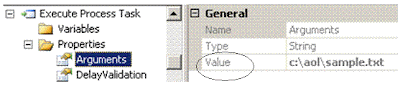

Then, when you execute your SSIS package, the value of Arguments in Execute Process Task will be replaced by the value of registry MyPackage1. The value of ConnectionString will be replaced by the value of MyPackage2 registry key.
You can run your package with different values without modify your SSIS package.
===

Create a SSIS project with two tasks:
Execute Process Task and Data Flow Task
When you define the Execute Process Task, two properties are specified. They are:
After you double-click on the Data Flow task and Navigate to Data Flow pane, you add an OLEDB Connection Manager and set its connection string similar to the following:
Data Source=QUEEN;Initial Catalog=AdventureWorks;Provider=SQLNCLI.1;Integrated Security=SSPI;Auto Translate=False;
Save the SSIS project, click on Control Flow pane, click SSIS menu and select Package Configuration Wizard. This time, choose the Registry as the SSIS Package Configuration Locations.
Then, when you execute your SSIS package, the value of Arguments in Execute Process Task will be replaced by the value of registry MyPackage1. The value of ConnectionString will be replaced by the value of MyPackage2 registry key.
You can run your package with different values without modify your SSIS package.
===
To save the package configuration to database table:
 Open the dbo.[SSIS Configurations] table, identify the row with Configuration Filter set to example1, modify the configuredValue, and rerun the package:
SQL:SSIS package configuration
What does "SSIS uses the package configuration to update the values of properties within packages at run time" mean?
 Create an SSIS project;
Create a Package Configuration
 After the configuration, value of environment variable ConnectStr will replace the ConnectionString target property; The value of environment variable MyFile will replace the Arguments of Execute Process Task.
Save the package configuration to Environment Variables
Create environment variables:ConnectStr and MyFile
Create an SSIS project;Create a Package Configuration
After the configuration, value of environment variable ConnectStr will replace the ConnectionString target property; The value of environment variable MyFile will replace the Arguments of Execute Process Task.Your package will execute against different values when the values of Environment variables change.
Monday, November 26, 2007
SQL:FOREACH LOOP
Import data from many flat files into a table
1.00050025;9/7/2001 0:00;0.99990001
 Double-click on Flat File Source and make sure that the column names are correctly mapped. And then, double-click on the OLE DB Destination, click on the Mapping, you should have the following:
 Execute the package;
 Double-click the Lesson 2.dtsx package;

 Select "Connection to AOL Folder", Properties pane:

Execute the Lesson 2.dtsx package; Data from both Sample1.txt and Sample2.txt are imported into Currency table.
Creating a destination table
USE [AdventureWorks]
GO
CREATE TABLE [dbo].[Currency](
[AverageRate] [numeric](18, 8) NULL,
[InceptionDate] [datetime] NULL,
[CurrentRate] [numeric](18, 8) NULL
)
GO
CREATE TABLE [dbo].[Currency](
[AverageRate] [numeric](18, 8) NULL,
[InceptionDate] [datetime] NULL,
[CurrentRate] [numeric](18, 8) NULL
)
Creating flat files and Save them in C:\AOL folder
Sample1.txt:
1.00010001;9/3/2001 0:00;0.99960016
1.00020001;9/4/2001 0:00;1.001001001
1.00020004;9/5/2001 0:00;0.99990001
1.00020002;9/6/2001 0:00;1.00040015
Sample2.txt
Sample2.txt
1.00050025;9/7/2001 0:00;0.99990001
1.00050026;9/8/2001 0:00;1.001001001
1.00050045;9/9/2001 0:00;1
1.00010001;9/10/2001 0:00;1.00040016
1.00020004;9/11/2001 0:00;0.99990001
1.00020004;9/12/2001 0:00;1.00110121
Creating one file importing package:
Creating one file importing package:
BIDS--new integration project--rename the package.dtsx to Lesson 1.dtsx
 Connection to AOL Folder manager will access the c:\sample1.txt, sample2.txt, etc.
General--FileName: C:\AOL\sample1.txt
Advanced -- the column names and data type
Queen.AdventureWorks connection manager will access the AdventureWorks database on SQL Server:QUEEN.
Drag the Data Flow item onto the Control Flow pane and double click it to navigate onto the Data Flow pane
Double-click on Flat File Source and make sure that the column names are correctly mapped. And then, double-click on the OLE DB Destination, click on the Mapping, you should have the following:Execute the package;In Query Window, SELECT * FROM dbo.Currency. All data in sample1.txt should be imported into dbo.Currency table of AdventureWorks database.
===
Import data from many flat files --FOREACH LOOP
Copy the Lesson 1.dtsx package and paste it to create the Lesson 2.dtsx package;
Copy the Lesson 1.dtsx package and paste it to create the Lesson 2.dtsx package;
Double-click the Lesson 2.dtsx package;You are in the Control Flow Pane. Drag the FOREACH Loop Container onto the Control Flow Pane; double-click it to open the FOREACH LOOP Editor. Folder: C:\AOL and Files: Sample??.txt.
Variable Mappings:
Drag the Data Flow Task into Foreach Loop Container
Select "Connection to AOL Folder", Properties pane:Execute the Lesson 2.dtsx package; Data from both Sample1.txt and Sample2.txt are imported into Currency table.
Subscribe to:
Posts (Atom)