Showing posts with label VPN. Show all posts

Wednesday, June 18, 2008

Linksys 4 port VPN router RV042: VPN Client Access

RV042
Network Layout


VPN Client Access


Create a VPN user


Export certificate for client

At the XP machine, install QuickVPN+Client+v1.2.8, which can be downloaded at http://www.linksys.com/
copy the certificate to the VPN client software folder, e.g. %programFiles%\Linksys\Linksys VPN Client.
Run the Linksys VPN Client:
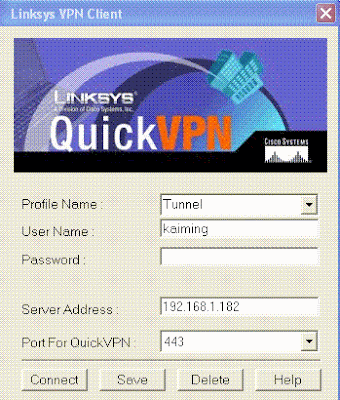
Click Connect button,
The XP client machine can access the 2003 computer, which locates on 192.168.2.0/24 network.

Client to Gateway vs. VPN Client Access
Client to Gateway is not customer friendly. It requires the knowledge of IPSec configuration at the client side.
VPN Client Access is more flexible. For a global company with many VPN routers, administrator could copy the routers' certificates to the VPN client folder and configure many profiles. When the customer travels to different location, he or she activates the corresponding profile.

Linksys 4 port VPN router RV042: Client to Gateway

Network Layout

Working at RV042:
Firewall: uncheck "Block WAN Request"
VPN: Client to Gateway
Add a tunnel
Tunnel Name: Kaiming
Local Security Gateway Type:IP Only
IP address:192.168.1.182
Local Security Group Type: Subnet
IP address:192.168.2.0/255.255.255.0
Remote Client:IP Only
IP address:192.168.1.164

IP Sec Setup

Keying Mode:IKE with Preshared key
Phase1 DH Group:Group 1
Phase1 Encryption:DES
Phase1 Authentication:MD5
Phase1 SA Life Time: 28800
Perfect Forward Secrecy:checked
Phase2 DH group: Group1
Phase2 Encryption:DES
Phase2 Authentication:MD5

Phase2 SA Life Time:3600

Preshared Key:nifcs

==============

Windows 2003 Server

IP address:192.168.1.164

Before I set up the IPSec policy, the 2003 server cannot talk to 192.168.20/24 network. But it can access Internet.

MMC--Add a snapin--GPO edit--Local Computer policy


I modify the IPSec settings according to the RV042 VPN router's IPSec.

Locate the IPSec--new ip security policy wizard


========
When the 2003 server accesses the Internet, the VPN tunnel is not established. When I ping 192.168.2.100, the tunnel is established. The 2003 server can access the 192.168.2.0/24 network.