Friday, November 30, 2007

SQL:SSIS registry package configuration

Create two registry key directly under HKEY_CURRENT_USER

Create a SSIS project with two tasks:

Execute Process Task and Data Flow Task

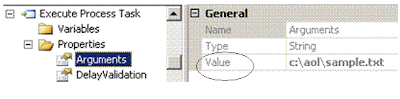
When you define the Execute Process Task, two properties are specified. They are:


After you double-click on the Data Flow task and Navigate to Data Flow pane, you add an OLEDB Connection Manager and set its connection string similar to the following:

Data Source=QUEEN;Initial Catalog=AdventureWorks;Provider=SQLNCLI.1;Integrated Security=SSPI;Auto Translate=False;

Save the SSIS project, click on Control Flow pane, click SSIS menu and select Package Configuration Wizard. This time, choose the Registry as the SSIS Package Configuration Locations.


Then, when you execute your SSIS package, the value of Arguments in Execute Process Task will be replaced by the value of registry MyPackage1. The value of ConnectionString will be replaced by the value of MyPackage2 registry key.

You can run your package with different values without modify your SSIS package.
===

To save the package configuration to database table:

Open the dbo.[SSIS Configurations] table, identify the row with Configuration Filter set to example1, modify the configuredValue, and rerun the package:

SQL:SSIS package configuration

What does "SSIS uses the package configuration to update the values of properties within packages at run time" mean?
Save the package configuration to Environment Variables

Create environment variables:ConnectStr and MyFile
Create an SSIS project;

Create a Package Configuration

After the configuration, value of environment variable ConnectStr will replace the ConnectionString target property; The value of environment variable MyFile will replace the Arguments of Execute Process Task.
Your package will execute against different values when the values of Environment variables change.

Thursday, November 29, 2007

Telnet and Exchange

http://support.microsoft.com/kb/153119

If you are having problems sending over SMTP between two Exchange servers, you Telnet on the sending server to connect to port 25 on the destination server.

1. Connect to your SMTP server
telnet vanbackup.vanstudents.com 25

2. Sent by a client to identify itself, usually with a domain name, the start of an ESMTP session.
ehlo test.com
250-VanBackup.vanstudents.com Hello [192.168.35.22]
250-TURN
250-ATRN
250-SIZE
250-ETRN
250-PIPELINING
250-DSN
250-ENHANCEDSTATUSCODES
250-8bitmime
250-BINARYMIME
250-CHUNKING
250-VRFY
250-X-EXPS GSSAPI NTLM LOGIN
250-X-EXPS=LOGIN
250-AUTH GSSAPI NTLM LOGIN
250-AUTH=LOGIN
250-X-LINK2STATE
250-XEXCH50
250 OK


3.
tell the receiving SMTP server who the message is from
MAIL FROM: admin@test.com
250 2.1.0 admin@test.com....
Sender OK

4.tell the receiving SMTP server whom the message is to:

(After the Subject line, press the ENTER key twice. To end the message, the last line must be with only one dot.) Temporiarily enable the anonymous relay, if SMPT virtual server does not allow the anonymous relay, you will get the error message: unable to relay for phil@eidam.com.


RCPT TO: phil@eidam.com
550 5.7.1 Unable to relay for phil@eidam.com
RCPT TO: phil@eidam.com
550 5.7.1 Unable to relay for phil@eidam.com
RCPT TO: administrator@vanstudents.com
250 2.1.5 administrator@vanstudents.com
DATA
354 Start mail input; end with .
Subject: Test Message


This is a test.
.
250 2.6.0 Queued mail for delivery

5. To close the connection, type
QUIT
===
Advanced testing

You can use a delivery receipt to test mail in both directions.

RCPT TO: phil@eidam.com notify=success,failure

Disable the open relay!!


Monday, November 26, 2007

SQL:FOREACH LOOP

Import data from many flat files into a table

Creating a destination table

USE [AdventureWorks]
GO
CREATE TABLE [dbo].[Currency](
[AverageRate] [numeric](18, 8) NULL,
[InceptionDate] [datetime] NULL,
[CurrentRate] [numeric](18, 8) NULL
)

Creating flat files and Save them in C:\AOL folder

Sample1.txt:

1.00010001;9/3/2001 0:00;0.99960016
1.00020001;9/4/2001 0:00;1.001001001
1.00020004;9/5/2001 0:00;0.99990001
1.00020002;9/6/2001 0:00;1.00040015

Sample2.txt

1.00050025;9/7/2001 0:00;0.99990001
1.00050026;9/8/2001 0:00;1.001001001
1.00050045;9/9/2001 0:00;1
1.00010001;9/10/2001 0:00;1.00040016
1.00020004;9/11/2001 0:00;0.99990001
1.00020004;9/12/2001 0:00;1.00110121
Creating one file importing package:


BIDS--new integration project--rename the package.dtsx to Lesson 1.dtsx


Connection to AOL Folder manager will access the c:\sample1.txt, sample2.txt, etc.

General--FileName: C:\AOL\sample1.txt


Advanced -- the column names and data type


Queen.AdventureWorks connection manager will access the AdventureWorks database on SQL Server:QUEEN.


Drag the Data Flow item onto the Control Flow pane and double click it to navigate onto the Data Flow pane

Double-click on Flat File Source and make sure that the column names are correctly mapped. And then, double-click on the OLE DB Destination, click on the Mapping, you should have the following:
Execute the package;

In Query Window, SELECT * FROM dbo.Currency. All data in sample1.txt should be imported into dbo.Currency table of AdventureWorks database.


===


Import data from many flat files --FOREACH LOOP

Copy the Lesson 1.dtsx package and paste it to create the Lesson 2.dtsx package;
Double-click the Lesson 2.dtsx package;


You are in the Control Flow Pane. Drag the FOREACH Loop Container onto the Control Flow Pane; double-click it to open the FOREACH LOOP Editor. Folder: C:\AOL and Files: Sample??.txt.


Variable Mappings:


Drag the Data Flow Task into Foreach Loop Container

Select "Connection to AOL Folder", Properties pane:


Execute the Lesson 2.dtsx package; Data from both Sample1.txt and Sample2.txt are imported into Currency table.

Sunday, November 25, 2007

SQL:Integration Services-SSIS--Creating a data flow task

BIDS

Step 1:


Step 2:Double-click on the Data Flow Task to navigate onto Data Flow pane

The package is saved as dtsx file.

How to save a copy of dtsx file to MSDB database?


  • Close the project
  • Open it again
  • In the solution explorer, double-click the project,
You can save the package to SQL Server.
==

How does the Lookup transformation work?

Saturday, November 24, 2007

SQL:report security--default security roles

Browser
May view folders, reports and subscribe to reports.
The BROWSER cannot deploy a report and cannot upload files (resources).
Content Manager
May manage content in the Report Server. This includes folders, reports and resources.
My Reports
May publish reports and linked reports; manage folders, reports and resources in a users My Reports folder.
Publisher
May publish reports and linked reports to the Report Server. What is a resource?
When you upload a file to report server, the file is a resource.
Publisher can create a report by BIDS and deploy it to the REPORT SERVER. However, the publisher cannot RUN or execute the report definition (cannot Start execution from report definition without publishing it to Report Server). And, the publisher can upload a graphics address.jpg. But it cannot view the content.
Report Builder
May view report definitions.
===
How to assign the site-wide security?
http://localhost/reports
Site Settings --Security--Configure site-wide security

System Administrator
View and modify system role assignments, system role definitions, system properties, and shared schedules.
System User
View system properties and shared schedules and Execute Report Definitions.

By default, BUILTIN\Administrators is the member of System Administrator role and Content Manager role.

SQL:Linked report

A linked report is a shortcut to the base-report but with its own properties: parameters, execution, and history. For example, you create a base report with the following query:
Dataset 1:AdventureWorks
SELECT FirstName, LastName, e.Title
FROM HumanResources.Employee AS e
JOIN Person.Contact AS c ON e.ContactID = c.ContactID
WHERE e.Title IN (@Title)
Dataset2: TitleList
SELECT DISTINCT Title FROM HumanResources.Employee

Then, you can create a linked report with Title specified as Accountant,Marketing Assistant,Engineering Manager. When a user views the linked report, it only includes the 3 categories information.


==


cached report


When the first user opens the report, the report is placed a temporary copy of the report in a cache . When the subsequent users open the report, the report is returned from cache instead of being processing again. Cached reports will be expired at the set time.


report snapshot


When you want to create a report during off-peak period, you can schedule the report creation--snapshot. A snapshot report will not expire. It can be overwritten by the new one. A report history has many report snapshots.

In the site settings, you can define the number of snapshots are stored in a report history.


SQL:report subscription--Data-Driven--TimedSubscription

Every 10 minutes, reports are delivered to a shared folder \\\queen\aol. Each TITLE has a report created.
First, create a base report definition:
Dataset 1:AdventureWorks
SELECT FirstName, LastName, e.Title
FROM HumanResources.Employee AS e
JOIN Person.Contact AS c ON e.ContactID = c.ContactID
WHERE e.Title IN (@Title)

Dataset2: TitleList
SELECT DISTINCT Title FROM HumanResources.Employee
Data Source must be defined as "Credentials stored securely in report server".

Creating a data-driven subscription:
Defining the recipient list:

SELECT DISTINCT Title FROM HumanResources.Employee
Extensions:


Other extensions have the quite similar explanation.

Last, deliver reports based on the Title parameter. If you select the static value, all reports are same but are automatically delivered to all recipients.

From \\\queen\aol folder, you will see the reports created:
===
Deliver reports through E-Mail
First, Run "Reporting Service Configuration"
Email Settings must be turned GREEN.
And then, create a table or modify the existing table with Email Address data.
Last, create a data-driven subscription with email delivery selection.

==
Useful example
You create a report named SalesDeviation, which includes Sales Target and Sales Representative's actual sales. All sales representatives do not meet their goals must be automatically received a deviation report.
You can accomplish the task by creating a data-driven report.
Create a data-driven subscription to the SalesDeviation report. Then, for the subscription's recipient, specify a Transat-SQL query that returns the names of sales representatives who have fallen short of their goals.

Thursday, November 22, 2007

SQL:report subscription--standard--one copy delivery

Why do you create a report subscription and how?

Assuming you have created a report with the following queries:
Dataset 1:AdventureWorks

SELECT FirstName, LastName, e.Title
FROM HumanResources.Employee AS e
JOIN Person.Contact AS c
ON e.ContactID = c.ContactID
WHERE e.Title IN (@Title)

Dataset2: TitleList
SELECT DISTINCT Title FROM HumanResources.Employee

The report is based on Dataset1:AdventureWorks. The report parameter:Title is automatically set. You need to modify some settings as shown below:
From report manager http://localhosts/reports, you can manually view the report--this is on-demand.


Scheduled report delivery is the report subscription.
First, access the report manager: http://localhost/reports and create the data source connection as follows --stored the User Name and its password in the report server--unattended.

Second, make sure the SQL Server Agent service starts.

Third, create a subscription for the report as PDF documents(deliver them to \\\Vision\SQLServer shared folder.

Every 5 minutes, a new report is created.
At the bottom of the screenshot, you notice the Report Parameter Values. You can select different value or values for the report.

If data of HumanResources.Employee table is changing constantly, the reports will reflect the change.

Wednesday, November 21, 2007

SQL:creating a parameterized report

My Computer Name is Vision. The default SQL Server is installed.
Business Intelligence Development Studio
New Project --Report Server Project Wizard


SELECT FirstName, LastName, e.Title
FROM HumanResources.Employee AS e
JOIN Person.Contact AS c
ON e.ContactID = c.ContactID
WHERE e.Title IN (@Title)

Click on Layout tab
Report Menu--Report Parameters
Because the query has a parameter (@Title), the report automatically includes it. Configuring the parameter as the follows:


Multi-value --checked


Non-Query--checked with 3 static values: Design Engineer, Accountant, and Marketing Assistant.


Deploy the report;


=================


Available value From query


Create a new dataset called title with statement "SELECT DISTINCT title FROM HumanResources.Employee":

Click on Layout tab, Report Menu--Report Parameters, this time select FROM QUERY with dataset:TitleDeploy the report;


Click the View Report button;

Saturday, November 17, 2007

SQL server and Kerberos Authentication

Apply Service Pack 2 on ALL SQL Server computers, including the clients. If the SP2 is not installed, Kerberos authentication may not be established.


Scenario


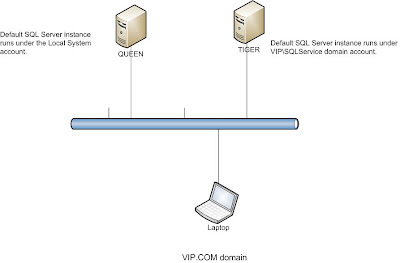
Domain:VIP.COM

Domain controller: QUEEN

The default SQL server instance runs under Local System account. The SPN is automatically registered.


setspn -l queenRegistered ServicePrincipalNames for CN=QUEEN,OU=Domain Controllers,DC=VIP,DC=COM: MSSQLSvc/queen.VIP.COM:1433


Workstation:XP with client components installed. After establishing a connection to QUEEN by specifying TCP:QUEEN, run the statement:


Select net_transport,auth_scheme from sys.dm_exec_connections

However, if you connect to the SQL Server instance from the QUEEN computer itself, even you specify the TCP:QUEEN, the auth_scheme is still NTLM.
If the service account is a domain account, e.g. VIP\sqlservice, you must manually register the SPN for it. SetSPN -A MSSQLSvc/Queen.VIP.COM:1433 VIP\sqlservice. You must raise your domain function level to Windows server 2003 level. In Active Directory Users and Computers, set the DELEGATION property to be trusted.
To force the connection to use Named Pipe, specify np:queen when connecting to SQL Server.

Wednesday, November 14, 2007

SQL:Linked server --SPN --Security Mapping

You must apply SQL Server SP2 on all SQL computers, including the clients.


  • Creating a Linked server to TIGER SQL Server.
EXEC sp_addlinkedserver 'TIGER','SQL SERVER'
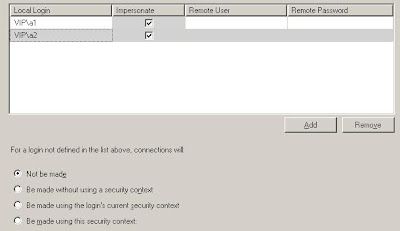
Making sure the security is set to self-mapping, as shown below:
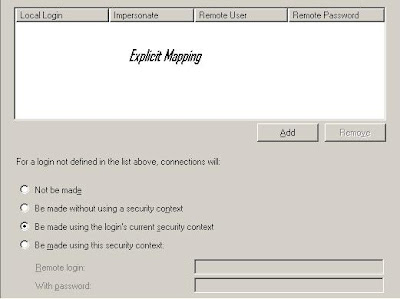
Becaue the SQL Server Instance runs under the LocalSystem account, its SPN is automatically registered. You can check the SPN:
setspn -L QUEEN
Registered ServicePrincipalNames for CN=QUEEN,OU=Domain Controllers,DC=VIP,DC=COM:
MSSQLSvc/queen.VIP.COM:1433
Because the service account of TIGER SQL SERVER Instance is a domain user account without administrator privileges, you must register ServicePrincipalNames for CN=sqlservice,CN=Users,DC=VIP,DC=COM

setspn -A MSSQLSvc/Tiger.VIP.COM:1433 VIP\SQLService


  • Creating two domain users: a1 and a2;

  • Creating two logins for them in both SQL Server instances;

  • In TIGER SQL Server, creating a database user in AdventureWorks database and assigning it the SELECT permission on AdventureWorks.Person.Address table;

  • At laptop computer, login as user a1, open the query window that connects QUEEN SQL Server instance; Run the distributed query statement, SELECT TOP 6 * FROM TIGER.AdventureWorks.Person.Address

  • At laptop computer, login as user a2, open the query window that connects QUEEN SQL Server instance; Run the distributed query statement, SELECT TOP 6 * FROM TIGER.AdventureWorks.Person.Address

No permission to run the statement.

  • Understanding the IMPERSONATE button

If Windows user mapping exists, distributed query goes ahead. Otherwise, not be made. Or Be made without using a security context; or Be made using this security context--specify a user account.
  • Explicit-mapping without impersonating

EXEC sp_addlinkedsrvlogin 'TIGER',False,'VIP\a1','SQLuser','password'

EXEC sp_addlinkedsrvlogin 'TIGER',False,'VIP\a2','SQLuser','password'

The TIGER SQL SERVER instance must be in MIXED security mode. The remote user can only be a SQL Server login.

"Login Failed for user 'NT Authority\ANONYMOUS' LOGON" shows.


Reason:

Lou:SQL Server does not have a SPN for its SQL Server service registered.

"Login Failed for user ' ', the user is not associated with a trusted SQL Server connection".
Reason:Norton SQL Server does not have the account defined and no permission assigned.

SQL Server Log

"The SQL Network Interface library could not register the Service Principal Name (SPN) for the SQL Server service. Error: 0x2098, state: 15. Failure to register an SPN may cause integrated authentication to fall back to NTLM instead of Kerberos. This is an informational message. Further action is only required if Kerberos authentication is required by authentication policies."


When both SQL Server instances start using Local System account or with a domain account that is a member of Administrators group,

How to enable the delegation tab shown above?


  • Raise the domain function level to Windows server 2003

  • SetSPN -A MSSQLSvc/Queen.VIP.COM:1433 sqlservice

If you have multiple instances installed within the same server, you don't need the SQL Service SPN registration and the service account is trusted for delegation. Even I manually delete the SPN registration and disable the service account delegation, the self-mapping of linked server works fine as long as both instances have the Windows login name defined and the necessary permissions assigned.

Tuesday, November 13, 2007

SQL:linked server


Working at DataServer1

Creating a linked server to DataServer2, which has the default SQL Server instance installed.


EXEC sp_addlinkedserver
@server='Linked_to_DataServer2',
@srvproduct='',
@provider='SQLNCLI',
@datasrc='DataServer2'


Or,

EXEC sp_addlinkedserver @server='DataServer2', @srvproduct='SQL Server'


====

If you have a named instance:SQLExpress installed, you could create a linked server as:

EXEC sp_addlinkedserver @server='Linked_to_DataServer2_Express', @srvproduct='', @provider='SQLNCLI', @datasrc='DataServer2\SQLExpress'


Or,


EXEC sp_addlinkedserver @server='DataServer2\SQLExpress', @srvproduct='SQL Server'

Notes: make sure that SQL EXPRESS accepts connection remotely.

===

How to create a linked server to ORACLE database?

  • Provider Name:MSDAORA --Microsoft OLE DB Provider for Oracle
  • SQL*Net alias for Oracle database --how to?

Oracle home--Net8 Assistant --Net8 Configuration > Local > Service Naming

  • Enter a Net Service Name:MyOracle
  • Select TCP/IP as the protocol
  • Enter the hostname of the database server machine. The port number will be 1521 by default.


EXEC sp_addlinkedserver
@server='DataServer2 Oracle',
@svrproduct='oracle',
@provider='MSDAORA',
@datasrc='MyOracle'

===

If you connect to an access database (C:\msoffice\test.mdb), you run the following:


EXEC sp_addlinkedserver
@server = 'Connect_to_MyAccess',
@provider = 'Microsoft.Jet.OLEDB.4.0',
@srvproduct = 'OLE DB Provider for Jet',
@datasrc = 'C:\MSOffice\test.mdb'
GO

Explicit User Mapping

You cannot create a user mapping for a domain account.
EXEC sp_addlinkedsrvlogin 'Norton','FALSE','VANSTUDENTS\TEST','VANSTUDENTS\TEST','password'
EXEC sp_droplinkedsrvlogin 'Norton','VANSTUDENTS\TEST'

You should map a domain user to a SQL Server account in the other SQL Server. The following statement works fine for the distributed query, as long as the User alice has the necessary permission on the database objects.


EXEC sp_addlinkedsrvlogin 'Norton','FALSE','VANSTUDENTS\TEST','alice','alice'

Monday, November 12, 2007

SQL:reporting service

If your Reporting Service is installed but not configured, you must configure it by using Reporting Services Configuration Manager
Report Server Virtual Directory:ReportServer
Report Manager Virtual Directory:Reports

IIS should have two virtual directories created: Reports and ReportServer.
SQL Server Management Studio should include two databases: ReportServer and ReportServerTempDB.

Creating a report

SQL Server Business Intelligence Development Studio(BIDS)
Following the wizard to create a base report: MyAddress;
Right-click on the MyAddress.rdl --Select "Deploy" --Close the BIDS;

Report Manager: http://localhost/reports

Understanding the Data Source settings--when generating the report, a dialog box is popped up.
When "Use as Windows credentials when connecting to the data source" is checked, VIP\John, VIP\simon, and VIP\Administrator can be used. If it is cleared, the user:reportuser can be used. the reportuser is SQL server user.

When a report is scheduled (that means it is run unattendedly), you select "Credentials stored securely in the report server". What does "Impersonate the authenticated user after a connection has been made to the data source" mean?

You should understand the SETUSER command. It allows a member of the sysadmin fixed server role or db_owner fixed database role to impersonate another user.
http://localhost/reports -->Creating a report with SELECT TOP 5 AddressLine1 FROM Person.Address; -->assign the report permissions as:

BUILTIN\Administrators:Content Manager
VIP\John:Browser
VIP\Simon:Browser

VIP\John has the SELECT permission on Person.Address table. In FireFox Browser address bar, type http://localhost/reports and logon as VIP\John. The user VIP\John can run the report.
VIP\Simon does not have the SELECT permission on Person.Address table. VIP\Simon cannot run the report even though the connection is made by VIP\Administrator.
You cannot ask VIP\Simon to impersonate the VIP\Administrator.
You must uncheck the "Impersonate the authenticated user after the connection has been made to the data source" when you run an unattended report creation, such as scheduled report creation.

Friday, November 9, 2007

SQL: Event Notifications

It is an alternative to DDL triggers and SQL Trace.


When a DDL statement runs or a SQL trace event occurs, it sends the related information to Service Broker service.

Service Broker includes a message type and contract specifically for event notifications. The Service Broker has defined the contract

http://schemas.microsoft.com/SQL/Notifications/PostEventNotification.

Assuming the AdventureWorks database will receive the messages.


ALTER DATABASE AdventureWorks
SET ENABLE_BROKER

/*If you got the error message "An exception occurred while enqueueing a message in the target queue. Error: 15404, State: 11. Could not obtain information about Windows NT group/user 'QUEEN\Administrator', error code 0x534.", run the following statement.*/
ALTER AUTHORIZATION ON DATABASE::AdventureWorks TO [sa];


USE AdventureWorks
GO
CREATE QUEUE NotifyQueue ;
GO
CREATE SERVICE NotifyService
ON QUEUE NotifyQueue
([http://schemas.microsoft.com/SQL/Notifications/PostEventNotification]);
GO
CREATE ROUTE NotifyRoute
WITH SERVICE_NAME = 'NotifyService',
ADDRESS = 'LOCAL';
GO

--Find out the service_broker_guid
SELECT name,service_broker_guid,is_broker_enabled FROM sys.databases WHERE database_id=DB_ID('AdventureWorks')

name:AdventureWorks

service_broker_guid: 93576EF7-2297-4F84-9842-4E6854D3FD10

is_broker_enabled: 1

--Create the server-scoped notifications
CREATE EVENT NOTIFICATION DropDatabaseNotification
ON SERVER
FOR DROP_DATABASE
TO SERVICE 'NotifyService', '93576EF7-2297-4F84-9842-4E6854D3FD10';

CREATE EVENT NOTIFICATION CreateDatabaseNotification

ON SERVER

FOR DROP_DATABASE

TO SERVICE 'NotifyService', '93576EF7-2297-4F84-9842-4E6854D3FD10';

--Create a testing database: bData

CREATE DATABASE bData;

--Create the database-scoped notification

USE bData

GO
CREATE EVENT NOTIFICATION create_table_notify
ON DATABASE
FOR CREATE_TABLE
TO SERVICE 'NotifyService',
'93576EF7-2297-4F84-9842-4E6854D3FD10';;

GO

CREATE EVENT NOTIFICATION alter_table_notify

ON DATABASE

FOR ALTER_TABLE

TO SERVICE 'NotifyService','93576EF7-2297-4F84-9842-4E6854D3FD10';

--Check the notification message

USE AdventureWorks
GO
SET NOCOUNT ON
DECLARE @id uniqueidentifier;
DECLARE @body nvarchar(max);
DECLARE @type sysname;
BEGIN TRAN
WAITFOR
(RECEIVE TOP (100)
@type=message_type_name,
@id=conversation_handle,
@body=message_body
FROM [NotifyQueue]
),TIMEOUT 60;
PRINT @body;
COMMIT

Thursday, November 8, 2007

SQL Profiler, sys.dm_exec_query_stats,sys.dm_os_waits

Using sys.dm_exec_query_stats


  • When was the last time a particluar query executed?


  • How many times the query has been executed?
etc.

The following script shows the top 5 stored procedures that have many recompilations.
select top 5 sql_text.text, sql_handle, plan_generation_num, execution_count, dbid, objectid from sys.dm_exec_query_stats
cross apply sys.dm_exec_sql_text(sql_handle) as sql_text
where [plan_generation_num] >1
order by [plan_generation_num desc]


As you see, sys.dm_exec_query_stats view keeps the categorized history information. If you use the SQL Server profiler, you must categorize yourself.

SQL Server profiler
If you want to find the server process and the identities of transactions that are using excessive CPU resource.

How to use the sys.dm_os_wait_stats?
--Initialize it first

dbcc sqlperf ([sys.dm_os_wait_stats],clear) with no_infomsgs

---- Total waits are wait_time_ms
Select signal_wait_time_ms=sum(signal_wait_time_ms)
,'%signal (cpu) waits' = cast(100.0 * sum(signal_wait_time_ms) / sum (wait_time_ms) as numeric(20,2))
,resource_wait_time_ms=sum(wait_time_ms - signal_wait_time_ms)
,'%resource waits'= cast(100.0 * sum(wait_time_ms - signal_wait_time_ms) / sum (wait_time_ms) as numeric(20,2))
From sys.dm_os_wait_stats

Running the script, I got the following:

signal_wait_time_ms:11122
%signal (cpu) waits : 0.22
resource_wait_time_ms :4950448
%resource waits:99.78

From data, you could conclude that the CPU is not an issue. The resource wait takes long time. It is because I issue one statement: SELECT * FROM Person.Address. It is resource-intensive. If you run many queries that include the keyword JOIN, GROUP, and ORDER, there are many query plan recompilations, you will see the high number of signal_wait_time_ms. If the percentage of signal_waits is less than 25%, CPU performance is acceptible.

Why should you run DBCC SQLPERF('sys.dm_os_wait_stats',CLEAR)?
All data collected in sys.dm_os_wait_stats is cumulative since the last time the statistics were reset or the server was started. But if you restart the SQL Server Instance, it is reset automatically. That's say, you have make some changes to your system both hardware and configuration. If you don't want that old data affect your judgement and don't want to restart SQL Server instance, you run the DBCC SQLPERF('sys.dm_os_wait_stats',CLEAR).

There are more than 200 wait types. For example, lock waits (LCK_M_BU,LCK_M_IS, etc) indicate data contention by queries; page IO latch waits indicate slow IO response times; page latch update waits indicate incorrect file layout.
sys.dm_tran_locks
In the view, each row represents a currently active request to the lock manager for a lock that has been granted or is waiting to be granted. This view has no history data.
USE tempdb;
GO
CREATE TABLE Engine
(c1 int, c2 int);
GO
CREATE INDEX Engine_ci on Engine(c1);
GO
INSERT INTO Engine VALUES (1,1);
INSERT INTO Engine VALUES (2,2);
INSERT INTO Engine VALUES (3,3);
INSERT INTO Engine VALUES (4,4);
INSERT INTO Engine VALUES (5,5);
INSERT INTO Engine VALUES (6,6);
GO
You need to open 3 query windows. Each one creates a session.

Execute the script in Query Windows 1:

SET TRANSACTION ISOLATION LEVEL READ COMMITTED;
BEGIN TRAN
SELECT c1
FROM Engine
WITH(holdlock, rowlock);

Execute the script in Query Window 2:

BEGIN TRAN
UPDATE Engine SET c1 = 10

ROLLBACK --it is not run immediately. It runs after the session 1 runs ROLLBACK.

Execute the script in Query Window 3:

SELECT resource_type, resource_associated_entity_id,
request_status, request_mode,request_session_id,
resource_description
FROM sys.dm_tran_locks
WHERE resource_database_id = DB_ID('tempdb')


From the screenshot, you see the Request_status with WAIT. Its request_session_id is 56 and is a blocked session. The 54 is the blocking session.

To find out the user name of the user with the blocking connection:

execute sp_who 56

or

Use the Activity Monitor in Microsoft SQL Management Studio and locate the process 54.


SELECT resource_type, resource_database_id,
resource_associated_entity_id, request_mode,
request_session_id, blocking_session_id
FROM sys.dm_tran_locks as t1, sys.dm_os_waiting_tasks as t2
WHERE t1.lock_owner_address = t2.resource_address


Execute the statement in Query Window 1:

ROLLBACK;

Rerun the queries in Query Window 3--no information shows.

You can always run the DMVs and DMFs in a production server without causing excessive overhead. However, SQL Server profiler will generate a lot overhead on a production environment.

Tuesday, November 6, 2007

CHECKPOINT and Trace Flag 3505

Dirty pages are data pages that have been entered into the buffer cache and modified, but not yet written to disk. Checkpoint is a point at which all dirty pages are guaranteed to have been written to disk.

By default, SQL Server automatically controls the checkpoint interval. If few modifications are made to the database, the time interval between checkpoints can be long. If the database is constantly being modified, the automatic checkpoints occur more frequently.

If your database is in Simple Recovery mode, after the checkpoint runs, SQL Server will truncate the log file.

What is TRACE FLAGS?

The trace flags are used to temporarily set specific server characteristics or switch off a particular behavior. What does it mean?

Example: trace flag 3505
By default, SQL Server controls when the checkpoint occurs. SQL Server automatically issues checkpoints to reduce the SQL Server recovery time and to permit log space reuse (truncation).

When you don't want this default behavior happens for a critical period, you can set the TRACE FLAG 3505 ON as DBCC TRACEON(3505,-1). After the application completes, you can turn the automatic checkpoint on as DBCC TRACEOFF(3505).

DBCC TRACEON(3505,-1) -->disable the automatic checkpoints
DBCC TRACEOFF(3505,-1) -->enable the automatic checkpoints.

SQL: check the logspace used

DBCC SQLPERF(LOGSPACE);

SQL:Start SQL Server Instance in single user mode and SUSPECT_PAGES table

CD \Program Files\Microsoft SQL Server\MSSQL.1\MSSQL\Binn

sqlservr.exe -m :Default Instance

sqlservr.exe -m -s :Named Instance

When will you start the SQL server instance to the single user mode?

  • change server configuration options
  • recover a damaged master database or other system database

If you cannot connect to the single mode, it is possible that the SQL Server agent service is running, which uses the single connection.

REPAIR_ALLOW_DATA_LOSS

Database must be in single user mode

ALTER DATABASE AdventureWorks SET SINGLE_USER;
GO
DBCC CHECKDB('database',REPAIR_ALLOW_DATA_LOSS);
GO
--After fixing the database, set it to multi-user mode
ALTER DATABASE AdventureWorks SET MULTI_USER;
GO


When you run DBCC CHECKDB('database',REPAIR_ALLOW_DATA_LOSS) in single user model, it updates the msdb.dbo.SUSPECT_PAGES table.

Procedures of restore a damaged data page:
1.Get the page id from msdb..suspect_pages;
2. Start a page restore with a full database, file, or filegroup backup that contains the page;

RESTORE DATABASE database_name
PAGE = 'file:page [ ,...n ]' [ ,...n ]
FROM [ ,...n ]
WITH NORECOVERY
3.

Apply the most recent differentials .
Apply the subsequent log backups.

4. Create a new log backup of the database that includes the final log serial number of the restored pages.
5. Restore the new log backup with RECOVERY

Example:
RESTORE DATABASE
PAGE='1:57, 1:202, 1:916, 1:1016' FROM WITH NORECOVERY;
RESTORE LOG FROM
WITH NORECOVERY;
RESTORE LOG FROM WITH NORECOVERY;
BACKUP LOG TO myNewlog
RESTORE LOG <database> FROM myNewlog WITH RECOVERY;
GO

Backup medium not good

RESTORE WITH CONTINUE_AFTER_ERROR

when CONTINUE_AFTER_ERROR is used in RESTORE Statement, Data pages that fail verification will be logged into msdb..SUSPECT_PAGES table.


Sunday, November 4, 2007

Disk and volume status

Disk status:
Foreign:a dynamic disk from another computer is installed in a new computer. -->import Foreign Disk.

Missing:a dynamic disk is corrupted or disconnected. After the disk is repaired or reconnected, Reactivate Disk.

Offline: a dynamic disk might be corrupted or is only intermittently available. An error icon appears on the offline disk. REACTIVATE DISK may be used.

Online(error):I/O errors have been detected on a part of the disk. A warning icon appears on the disk.

Volume status:
  • Failed
  • Failed Redundancy:volume with failed redundancy can still be accessed but performance is not good. If a RAID 5 volume is available but slow, check whether one of the disks in a RAID-5 set has failed or gone offline.
  • Healthy(at Rsik): caused by bad sectors on the disk. If Reactivate DISK doesn't work, replace the disk.

SQL:Errors in tempdb and errors in log file

If the tempdb is full, all databases in the instance stop accepting updates. Error code will be 1101 or 1105.
If the transation log if full, error code is 9002. Only the database stop accepting updates.

SQL Server severity is from 0 to 29. The higher the severity number, the more severe the problem. By default, only error messages with a severity level above 19 are written to the SQL Server error log.

SQL:Batches and Transactions

A batch is a group of one or more Transact-SQL statements sent at one time from an application to Microsoft® SQL Server™ for execution. SQL Server compiles the statements of a batch into a single executable unit, called an execution plan. The statements in the execution plan are then executed one at a time.

A compile error, such as a syntax error, prevents the compilation of the execution plan, so none of the statements in the batch are executed.


A run-time error, such as an arithmetic overflow or a constraint violation, has one of two effects:

  • Most run-time errors stop the current statement and the statements that follow it in the batch.
  • A few run-time errors, such as constraint violations, stop only the current statement. All the remaining statements in the batch are executed.

The statements executed before the one that encountered the run-time error are not affected. The only exception is if the batch is in a transaction and the error causes the transaction to be rolled back. In this case, any uncommitted data modifications made before the run-time error are rolled back.


USE AdventureWorks
GO /* Signals the end of the batch */
CREATE VIEW auth_titles
AS
SELECT *FROM authors
GO /* Signals the end of the batch */
SELECT * FROM auth_titles
GO /* Signals the end of the batch */

Several batches combined into one transaction:


BEGIN TRANSACTION
GO
USE AdventureWorks
GO
CREATE TABLE mycompanies
(
id_num int IDENTITY(100, 5),
company_name nvarchar(100)
)
GO
INSERT mycompanies (company_name)
VALUES ('New Moon Books')
INSERT mycompanies (company_name)
VALUES ('Binnet & Hardley')
INSERT mycompanies (company_name)
VALUES ('Algodata Infosystems')
GO
SELECT *
FROM mycompanies
ORDER BY company_name ASC
GO
COMMIT
GO

SQL:Plan Guides

The Plan Guides feature in SQL Server 2005 provides a method for injecting query hints into SQL statements in batches, stored procedures (SP), and so forth. However, it does not require any modification to the query itself. The mechanism uses a look-up mapping table and is very useful when the query for which the plan has to be influenced or forced originates in a non-modifiable application.

sp_create_plan_guide @name = N'PlanGuide1', @stmt = N'SELECT COUNT(*) AS Total FROM Sales.SalesOrderHeader h, Sales.SalesOrderDetail d
WHERE h.SalesOrderID = d.SalesOrderID
and
h.OrderDate BETWEEN ''1/1/2000'' AND ''1/1/2005'' ',
@type = N'SQL', @module_or_batch = NULL, @params = NULL,
@hints = N'OPTION (MERGE JOIN)'
GO
--drop the plan guide
sp_control_plan_guide N'DROP', N'PlanGuide1'

SQL Server Profiler and fn_trace_gettable() system function

By default, SQL Server Set Default Trace Enabled to true. The default trace log is stored by default in the \MSSQL\LOG directory using a rollover trace file. The base file name for the default trace log file is log.trc.

The above screenshot shows there are 5 rollover trace files created.

You can open them in SQL Server Profiler.

Or, you can open them by fn_trace_gettable() function.

SELECT *
FROM fn_trace_gettable
('D:\Program Files\Microsoft SQL Server\MSSQL.1\MSSQL\LOG\log.trc', default)

You need only the base name for the trace log file. The fn_trace_gettable() will retrieve data from all the trace files.


One example record:


Login failed for user 'sa'. The user is not associated with a trusted SQL Server connection. [CLIENT: 24.239.217.223]

Somebody is trying to connect to my SQL server but login failed.

By default, the trace log files are limited to 32 MB and deleted after 14 days. You can disable the Default Trace Enabled option.


sp_configure 'show advanced options', 1;
GO
RECONFIGURE;
GO
sp_configure 'Default Trace Enabled', 0;
GO
RECONFIGURE;
GO

As you see from the screenshot below, the Standard(Default) template defines what classes are traced. If you don't check where to save the trace logs, they are saved in C:\Program Files\Microsoft SQL Server\MSSQL.1\MSSQL\LOG.

SQL Server Profiler

Server processes trace data:specify that the server running the trace should process the trace data. Using this option reduces the performance overhead incurred by tracing. If selected, no events are skipped even under stress conditions. If this check box is cleared, processing is performed by SQL Server Profiler, and there is a possibility that some events are not traced under stress conditions.


It is better to run SQL Server Profiler from a test computer and configures the profiler to connect the production SQL server.


SQL Server 2005 is a trace provider. The SQL Server Profiler is the consumer. SQL Server 2005 provides a full Event Tracing for Windows (ETW) functionality which can output most of SQL Trace events available for SQL Server Profiler.

Check your server for the trace provider:

C:\>logman query providers


SQL SERVER ERROR LOG

It records:backup and restore operatioons, batch commands, and scripts.

As you see from the screenshot, the SQL Server error log has 6 rotation files. The current error log is ERRRORLOG. The last one is errorlog.6.


A new errorlog is created each time the SQL INSTANCE starts. You can manually rotate the SQL Server error log by using the system stored procedure sys_cycle_errorlog.


What does the cycle mean?


You can run several times: EXEC sys_cycle_errorlog


You will find the following:


ERRORLOG -->errorlog.1


errorlog.1-->errorlog.2


How do you move the location of SQL Server error log?


  • Create a folder, e.g. C:\Program Files\Microsoft SQL Server\MSSQL.1\MSSQL\KKK

  • Make sure that the KKK folder security is as the screenshot

When the SQL Server instance is running, open SQL Server configuration Manager, select the SQL Server Instance, properties, Advanced Tab, and Start Parameter.


SQL Server Agent Error Log

SQL Server Agent creates an error log that, by default, records warnings and errors. The following types of messages are displayed in the SQL Server Agent error log:


  • Warning messages that provide information about potential problems, such as, "Job test was deleted while it was executing."

  • Error messages that usually require intervention by a system administrator to resolve, such as, "Unable to start mail session." Error messages can be sent to a specific user or computer by network popup.


SQL Server maintains up to nine SQL Server Agent error logs. Each archived error log has an extension indicating the relative age of the error log. For example, an extension of .1 indicates the newest archived error log and an extension of .9 indicates the oldest archived error log.


The current log for SQL Server agent error log is sqlagent.out. To manually recycle the agent error log, run the following statements.


USE msdb ;
GO
EXEC dbo.sp_cycle_agent_errorlog ;
GO

To move the SQL Server agent error log to a new location:
  • Start the SQL Server Agent
  • Right-click the Error Logs under the SQL Server Agent of SSMS console and change the path
  • Restart the SQL Server Agent to reflect the new path
The ACL of the new folder must be same as the original folder.

====
View SQL Server Error Logs and SQL Server Agent Error Logs:
Text Editor or SSMS
====
Because I restart my SQL Server instance all the time, the log files rotate without reaching the maximum file size. What is the maximum size of a SQL Server error log file or a SQL server agent error log file? I don't know. Anyway, it will rotate when the current log file reaches the maximum size, for example, 5MB.

SQL:Don't Use LOWER, UPPER, SUBSTRING in WHERE clause

Even though an index is created on column AddressLine1, the SQL Server engine does not choose it. It still scans the whole clustered index.


Add a column to Person.Address table


USE AdventureWorks


GO


ALTER TABLE Person.Address ADD UpperAddress NVARCHAR(60);


GO


UPDATE Person.Address SET UpperAddress=UPPER(AddressLine1)
GO


CREATE INDEX ix_UpperAddress ON Person.Address (UpperAddress) INCLUDE (AddressLine1) WITH DROP_EXISTING


It consumes more space but boosts the query performance a lot.


What is the KEY LOOKUP? The index does not cover all columns.

Observation: don't use * in your query; don't include a unnecessary column in your query.

SQL:DISTINCT keyword is costly

DISTINCT keyword eliminates the duplicates in the result set. However, it uses a lot of computer resources.


With comparison of the above two screenshots, the Clustered Index Seek costs the same. It is only 25% of the total cost with DISTINCT; whereas it costs 100% of the total cost without DISTINCT.


Observation: if you don't care about the duplicates in your result set, or you know there is no duplicates in your data, you should not use the DISTINCT keyword.
UNION statement specifies that multiple result sets are to be combined and returned as a single result set. By default, the DISTINCT will be used in the result set.


UNION ALL will boost the performance--no DISTINCT SORT operator cost.
Observation: UNION ALL should be used when duplication is not an issue in your result set.

Friday, November 2, 2007

SQL: Index Defragmentation

Extents and Pages

An Extent has 8 physically contiguous pages. A page has 8 KB.

Fragmentation alone is not a sufficient reason to reorganize or rebuild an index. The main effect of fragmentation is that it slows down page read-ahead throughput during index scans. This causes slower response times. If the query workload on a fragmented table or index does not involve scans, because the workload is primarily singleton lookups, removing fragmentation may have no effect.


The above diagram shows the logical defragmentation. When you have index scan, you should run the alter index ... reorganize; or other statements.


USE AdventureWorks;
GO
SELECT * FROM sys.dm_db_index_physical_stats
(DB_ID(N'AdventureWorks'), OBJECT_ID(N'Person.Address'), NULL, NULL , 'DETAILED');

  • avg_fragmentation_in_percent :The percent of logical fragmentation (out-of-order pages in the index).
  • fragment_count:The number of fragments (physically consecutive leaf pages) in the index.
  • avg_fragment_size_in_pages:Average number of pages in one fragment in an index.
If avg_fragmentation_in_percent > 5% and < = 30%, run the ALTER INDEX REORGANIZE If avg_fragmentation_in_percent > 30%, run the ALTER INDEX REBUILD WITH (ONLINE = ON)*


* Rebuilding an index can be executed online or offline. Reorganizing an index is always executed online. To achieve availability similar to the reorganize option, you should rebuild indexes online.


USE AdventureWorks;
GO
SELECT a.index_id, name, avg_fragmentation_in_percent
FROM sys.dm_db_index_physical_stats
(DB_ID(), OBJECT_ID(N'Production.Product'),
NULL, NULL, NULL) AS a
JOIN sys.indexes AS b ON
a.object_id = b.object_id
AND a.index_id = b.index_id;


ALTER INDEX AK_Product_Name ON Production.Product REBUILD WITH (ONLINE=ON);

rerun the script with sys.dm_db_index_physical_stats


The avg_fragmentation_in_percent should be as close to zero as possible. However, the Production.Product table is so small that the table and its indexes use one extent. The avg_fragmentation_in_percent is meaningless for small data.

The "ALTER INDEX index_name ON tableobject WITH REBUILD " is a replacement for DBCC DBREINDEX. CREATE INDEX with (DROP_EXISTING=ON) has the same functionality.

The "ALTER INDEX index_name ON tableobject WITH REORGANIZE" is a replacement for DBCC INDEXDEFRAG. It reorders the leaf level pages of an index. It is an online operation.

DROP and re-create an index--you can specify the FILLFACTOR. It is offline process.


SQL: APPLY OPERATOR

The APPLY operator allows you to invoke a table-valued function for each row returned by an outer expression of a query.
USE AdventureWorks
SELECT qs.sql_handle,qt.text
FROM sys.dm_exec_query_stats qs
cross apply sys.dm_exec_sql_text (qs.sql_handle) as qt
order by qs.sql_handle ASC
The sys.dm_exec_sql_text( ) is a function. It returns a table.

The APPLY operator does the following:
For each record returned from sys.dm_exec_query_stats, the sys.dm_exec_sql_text( ) runs. The result set is the combined columns from both sys.dm_exec_query_stats and sys.dm_exec_sql_text.

Thursday, November 1, 2007

SQL:Running, runnable, and suspended status

If you have only one CPU, only one process can run at a time. The current running process has running status. All processes waiting for CPU have the runnable status. When the CPU runs a process and finds out the required resource, e.g. data page, is not available at the moment, the process will be moved to wait list and its status will be SUSPENDED.


SLEEPING status
A session status of 'Sleeping' indicates SQL Server is waiting for the next SQL Server command.

The sys.dm_os_waiting_tasks DMV lists the data from the current wait list.

The sys.dm_exec_requests DMV lists the data from current runnable queue.

How do we use sys.dm_os_waiting_tasks and sys.dm_exec_requests?

The sys.dm_os_wait_stats contains the wait statistics since the start of SQL Server or since you run DBCC SQLPERF('sys.dm.os_wait_stats',CLEAR). As you see from above diagram, anytime a session (SPID) waits for a resource, the session will be moved into wait list queue. The wait_time_ms is the Total wait time for this wait type in milliseconds. This time is inclusive of signal_wait_time_ms in sys.dm_exec_requests.

So, the resource wait time=wait_time_ms - signal_wait_time_ms

The key question is not the length of the runnable queue but rather how much time is spent waiting for CPU compared to the resource waits of the wait list.

If signal_wait_time_ms/wait_time_ms is less 25%, you could conclude that the CPU pressure has little pressure because the resource waits cost a lot.

Wait and Queue

From an application perspective, the application waits for resources and waits for its request to be completed. Waits are represented by SQL Server wait statistics.

From a resource perspective, its queue measues its utilization. Performance Monitor objects and counters describe the queue.

Using APPLY operator with management function sys.dm_exec_sql_text

Largest IO queries.

To improve query performance by creating an index is to avoid doing large amounts of IO for the query in question.

To find the largest IO queries, use the following script:

USE MASTER
--- top 50 statements by IO
SELECT TOP 50
(qs.total_logical_reads + qs.total_logical_writes) /qs.execution_count as [Avg IO],
substring (qt.text,qs.statement_start_offset/2,
(
case
when qs.statement_end_offset = -1
then
len(convert(nvarchar(max), qt.text)) * 2
else
qs.statement_end_offset
end
- qs.statement_start_offset
)/2+1)
as query_text,
qt.dbid,
qt.objectid
FROM sys.dm_exec_query_stats qs
cross apply sys.dm_exec_sql_text (qs.sql_handle) as qt
ORDER BY [Avg IO] DESC

Why do we use statement_start_offset and statement_end_offset?

creating a batch and running it:


DECLARE @aa INT;
SET @aa=1000
SELECT top 5 * FROM Person.Address
WHERE AddressID<500 size="2">DECLARE @aa INT; SET @aa=1000 SELECT top 5 * FROM Person.Address WHERE AddressID<500


USE AdventureWorks
GO
SELECT qs.sql_handle,
substring (qt.text,qs.statement_start_offset/2,
(case when qs.statement_end_offset = -1
then len(convert(nvarchar(max), qt.text)) * 2
else qs.statement_end_offset end - qs.statement_start_offset+1)/2)
as query_text
FROM sys.dm_exec_query_stats qs
cross apply sys.dm_exec_sql_text(qs.sql_handle) as qt
ORDER BY qs.sql_handle

It will catch the following:
SELECT top 5 * FROM Person.Address WHERE AddressID<50

Observation:

sys.dm_exec_sql_text( ) function returns the TEXT of the QUERY, including variable definitions. Using the statement_start_offset and statement_end_offset retrieves only the query statement.

What is the sql_handle?
For batches, the SQL handles are hash values based on the SQL text. For database objects such as stored procedures, triggers or functions, the SQL handles are derived from the database ID, object ID, and object number.

Missing or poorly formed indexes (Microsoft)

Missing or poorly formed indexes can also cause excessive memory pressure or cache flushes. In some cases, SQL Server 2005 optimizer identifies potentially useful indexes to benefit a specific query.
The computed benefit of the index can be seen in the column avg_user_impact (percentage improvement with suggested index). It should be noted that this benefit applies to the individual query only where the maintenance cost is borne by inserts, updates, and delete operations.
-- Potentially Useful Indexes
select d.*
, s.avg_total_user_cost
, s.avg_user_impact
, s.last_user_seek
,s.unique_compiles
from sys.dm_db_missing_index_group_stats s
,sys.dm_db_missing_index_groups g
,sys.dm_db_missing_index_details d
where s.group_handle = g.index_group_handle
and d.index_handle = g.index_handle
order by s.avg_user_impact desc
go

--- suggested index columns and usage

declare @handle int
select @handle = d.index_handle
from sys.dm_db_missing_index_group_stats s
,sys.dm_db_missing_index_groups g
,sys.dm_db_missing_index_details d
where s.group_handle = g.index_group_handle
and d.index_handle = g.index_handle
select *
from sys.dm_db_missing_index_columns(@handle)
order by column_id

How to use them?

run the following query many times

USE AdventureWorks
SELECT AddressLine1,StateProvinceID from Person.Address
Where AddressLine1 like '1970 %'

And then,

Execute the script of Potentially Useful Indexes; You will have the report as:

index_handle: 4
database_id:6
object_id: 53575229
equality_columns:NULL
inequality_columns:[AddressLine1]
included_columns:[StateProvinceID]
statement:[AdventureWorks].[Person].[Address]
avg_total_user_cost:0.247314785185185
avg_user_impact: 84.66

last_user_seek:2007-11-01 12:28:02.170
unique_compiles: 4


Run the script of the suggested index columns and usage


Based on the recommendation, an index is created as follows:


USE [AdventureWorks]
GO
CREATE NONCLUSTERED INDEX [IX_Address_Province] ON [Person].[Address]
(
[AddressLine1] ASC
)
INCLUDE ( [StateProvinceID])


Running the Query Execution Plan, you will find the index seek is used.


SQL server alert by using database mail

  1. Microsoft SQL Server Management Studio

  2. Management --right click Database Mail --enable Database Mail and set an email account and public default profile, as shown below:

You must make sure that your email server (smtp) accepts your connection.


3. Create an operator, e.g. Administrator, which is associated with the email address you defined in database mail, e.g. Administrator@vanstudents.com.


4. Define an alert to use the database mail notification


When I read the text book regarding the alert notification by database mail, I was trying to accomplish it by using Windows Server Performance console. It is actually implemented inside SSMS.